Form JD-CV-69 Affidavit of Service, Petition For Order RE: COMMISSION ON HUMAN RIGHTS AND OPPORTUNITIES AND NOTICE OF HEARING
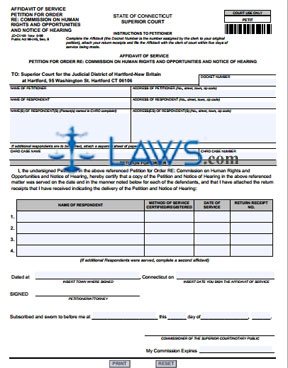
INSTRUCTIONS: CONNECTICUT AFFIDAVIT OF SERVICE PETITION FOR ORDER RE: COMMISSION ON HUMAN RIGHTS AND OPPORTUNITIES AND NOTICE OF HEARING (Form JD-CV-69)
When you file a form JC-CV-68 requesting a ruling of cause or no cause from the Connecticut Commission On Human Rights And Opportunities after two years from the ordered date of finding has passed, you must also file a form JD-CV-69. This document certifies all defendants have been served with a copy of form JD-CV-68. Both forms can be found on the website of the Connecticut Judicial Branch.
Connecticut Affidavit Of Service Petition For Order Re: Commission On Human Rights And Opportunities And Notice Of Hearing JD-CV-69 Step 1: Enter the docket number in the first blank box.
Connecticut Affidavit Of Service Petition For Order Re: Commission On Human Rights And Opportunities And Notice Of Hearing JD-CV-69 Step 2: Enter the name and address of the petitioner in the next two blank boxes.
Connecticut Affidavit Of Service Petition For Order Re: Commission On Human Rights And Opportunities And Notice Of Hearing JD-CV-69 Step 3: Enter the name and address of the Commission On Human Rights And Opportunities in the next two blank boxes.
Connecticut Affidavit Of Service Petition For Order Re: Commission On Human Rights And Opportunities And Notice Of Hearing JD-CV-69 Step 4: In the next two blank boxes, enter the names and addresses of all respondents named in the original complaint.
Connecticut Affidavit Of Service Petition For Order Re: Commission On Human Rights And Opportunities And Notice Of Hearing JD-CV-69 Step 5: In the next two blank boxes, enter the Commission On Human Rights and Opportunities case name and number.
Connecticut Affidavit Of Service Petition For Order Re: Commission On Human Rights And Opportunities And Notice Of Hearing JD-CV-69 Step 6: In the table provided below, you must list all respondents who were served with a copy of your petition. Enter their names in the first column, the method by which service was certified or registered in the second column, the date of service in the third column, and the return receipt number in the fourth column.
Connecticut Affidavit Of Service Petition For Order Re: Commission On Human Rights And Opportunities And Notice Of Hearing JD-CV-69 Step 7: Enter the town where you signed this document, the date and your signature in the presence of a commissioner of the Superior Court or a notary public.